

When I set up active-domain's custom domain name in my blog it has become very hard to me.First thing is that I didn't have concept about custom domain setting in blogger and second thing is that I didn't find any article that is related to active-domain setting in blogger neither blogger mentions about it.I has become hard for me to setup this domain name so I am going to tell you about "How to setup active-domain's domain name for your blog in blogger?" so that you never have problem in future for setting up active-domain's domain name for your blog.
There are some reasons why I choose active-domain for registering my blog domain nae although there are other cheap hosting sites like godaddy.com,coquiweb.com,etc.Main thing is that it accept payments through paypal whether your account is verified or unverified.This means if you like to get a custom domain name then make $10 with your blog by advertising or reviewing then buy a domain name with that amount and enjoy blogging.
There are mainly two places where you have to set up your domain.First in active-domain and second in Blogger.
Active-domain setting.
First of all register your domain name in active-domain.For the payment,they will redirect you to paypal in step 4 and you have to make your payment there.After that complete the registration wait for the domain name activation.Your domain name will be activated within 48 hours of your registration.They will notify you via Email.
After you domain name is activated Sign in into Your Active-Domain account.Then click on the domain name you want to use for your blog.After that they will take you to domain View/Modify page.Now provide the correct data in that Page as I will explain below.
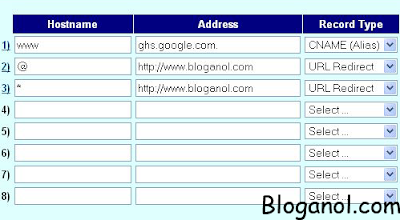 The above snapshot shows you the host settings table.This is the main part of your domain.Now supply the right information in that table.
Blogger Setup
There are some reasons why I choose active-domain for registering my blog domain nae although there are other cheap hosting sites like godaddy.com,coquiweb.com,etc.Main thing is that it accept payments through paypal whether your account is verified or unverified.This means if you like to get a custom domain name then make $10 with your blog by advertising or reviewing then buy a domain name with that amount and enjoy blogging.
There are mainly two places where you have to set up your domain.First in active-domain and second in Blogger.
Active-domain setting.
First of all register your domain name in active-domain.For the payment,they will redirect you to paypal in step 4 and you have to make your payment there.After that complete the registration wait for the domain name activation.Your domain name will be activated within 48 hours of your registration.They will notify you via Email.
After you domain name is activated Sign in into Your Active-Domain account.Then click on the domain name you want to use for your blog.After that they will take you to domain View/Modify page.Now provide the correct data in that Page as I will explain below.
 The above snapshot shows you the host settings table.This is the main part of your domain.Now supply the right information in that table.
- Select Record Type CNAME(Alias),Address ghs.google.com and hostname WWW in cell no 1 as in the snapshot.
- Select Record Type URL Redirect and hostname @ in cell no 2 as in the snapshot.In the address Type the address of your domain with http://www.Here I have written http://www.bloganol.com which is my new domain address.
- in cell no 3 Type Hostname *,Type address Record Type as in Cell no 2 .
Blogger Setup
- Sign in into blogger.
- Goto setting page of the blog you want to use custom domain name.
- After that goto publishing Page and Click Custom domain at the top right of that Page.
- After that Click on Switch to advanced settings.
- Now type your domain name there and Click Save setting.


