

There are many advantages of Keeping Technorati tags in your blog posts.It helps you to increase Technorati Rank and Authority.Adding Technorati Tags Using Hyperlink one by one is very boring and time consuming.Therefore we brought you a new tool to add Technorati tags below Each just by Entering Tags like Blogger.This multiple word technorati tag creator for blogger is created by our friends of consumingexperience.com.There are certain steps to be followed to install this Tag creator for your blog.
Step 1
You must need greasemonkey installed in your browser.If you have already installed it in your browser then its OK otherwise you must install greasemonkey in your browser and you must have Mozilla Firefox Browser.To get greasemonkey visit This Page.
Step 2
After you install greasemonkey in your browser Restart your browser(Recommended).Now you have to install a user script in your blog .For this Click on Get User script and Click Install.
Step 3
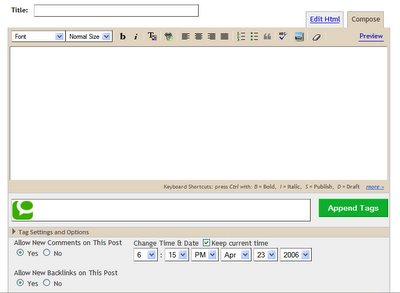
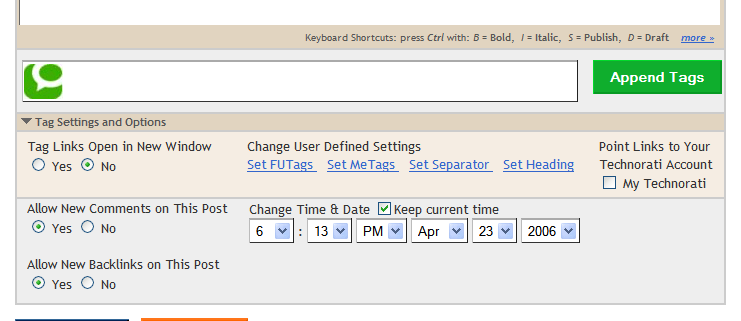
After you Install user script goto Posting Page in blogger you will see green Technorati icon for entering Tag , Green Append Button and tag and Setting options Link just like in the Snapshot Below.
How to Insert Tags in Posts?
For this enter you choice Tags in Tag box by separating using commas.eg blogger hacks,Blogger tools,......
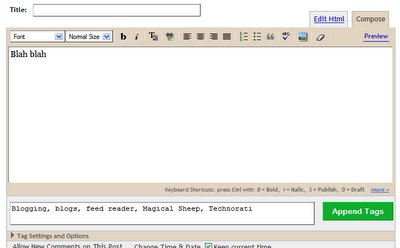
After you Enter Tags in Tag Box Click Append Tag Button.
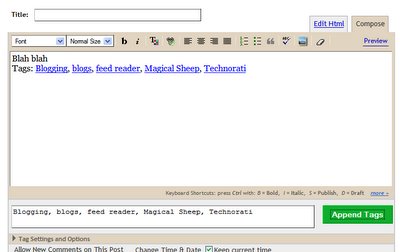
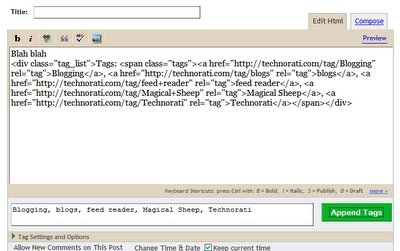
After you append Tags in your blog You can see your tag Code in Html section like this.
How to Open Tags in new Window?
To open Tags in new window Click Tag settings and options Link.After that Check on Yes on Tag Links open in new window.
Technorati Tags: Technorati, blogger Tools, Greasemonkey, Tags
Step 1
You must need greasemonkey installed in your browser.If you have already installed it in your browser then its OK otherwise you must install greasemonkey in your browser and you must have Mozilla Firefox Browser.To get greasemonkey visit This Page.
Step 2
After you install greasemonkey in your browser Restart your browser(Recommended).Now you have to install a user script in your blog .For this Click on Get User script and Click Install.
Step 3
After you Install user script goto Posting Page in blogger you will see green Technorati icon for entering Tag , Green Append Button and tag and Setting options Link just like in the Snapshot Below.
How to Insert Tags in Posts?
For this enter you choice Tags in Tag box by separating using commas.eg blogger hacks,Blogger tools,......
After you Enter Tags in Tag Box Click Append Tag Button.
After you append Tags in your blog You can see your tag Code in Html section like this.
How to Open Tags in new Window?
To open Tags in new window Click Tag settings and options Link.After that Check on Yes on Tag Links open in new window.
Technorati Tags: Technorati, blogger Tools, Greasemonkey, Tags


