We have been moved to http://www.bloganol.com/

Showing posts with label comment. Show all posts
Last day when I was converting a wordpress theme into Blogger I saw the comment numbering in the wordpress theme and I tried to show the Comment numbering in that Blogger Theme.So I searched the hack to show comment numbering and Finally found that hack in randomness.
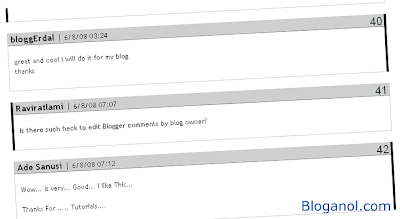
It was not so hard to show comment numbering in Blogger.It is just like showing commentators photo inside comments in Blogger.So I have brought this hack to you.Just follow the tutorial below.

Goto Blogger Edit Html page , Expand Widget Templates and Search for the Following block of codes.

<dl id='comments-block'>
<b:loop values='data:post.comments' var='comment'>
<dt class='comment-author' expr:id='"comment-" + data:comment.id'>
<a expr:name='"comment-" + data:comment.id'/>
<b:if cond='data:comment.authorUrl'>
<a expr:href='data:comment.authorUrl' rel='nofollow'><data:comment.author/></a>
<b:else/>
<data:comment.author/>
</b:if>
<data:commentPostedByMsg/>
</dt>
<dd class='comment-body'>
<b:if cond='data:comment.isDeleted'>
<span class='deleted-comment'><data:comment.body/></span>
<b:else/>
<p><data:comment.body/></p>
</b:if>
</dd>
<dd class='comment-footer'>
<span class='comment-timestamp'>
<a expr:href='"#comment-" + data:comment.id' title='comment permalink'>
<data:comment.timestamp/>
</a>
<b:include data='comment' name='commentDeleteIcon'/>
</span>
</dd>
</b:loop>
</dl>

Now in second step , replace the above block of codes with the following block of codes.

<dl id='comments-block'>

<script type='text/javascript'>var CommentsCounter=0;</script>

<b:loop values='data:post.comments' var='comment'>

<div class='' expr:id='data:comment.id'>

<dt expr:class='"comment-author " + data:comment.authorClass' expr:id='data:comment.anchorName'>
<a expr:name='data:comment.anchorName'/>
<b:if cond='data:comment.authorUrl'>
<a expr:href='data:comment.authorUrl'><data:comment.author/></a>
<b:else/>
<data:comment.author/>
</b:if>
<data:commentPostedByMsg/>

<span class='comment-number'>
<a expr:href='"#comment-" + data:comment.id' title='Comment Link'>
<script type='text/javascript'>
CommentsCounter=CommentsCounter+1;
document.write(CommentsCounter)
</script>
</a>
</span>

</dt>
<dd class='comment-body'>
<b:if cond='data:comment.isDeleted'>
<span class='deleted-comment'><data:comment.body/></span>
<b:else/>
<p><data:comment.body/></p>
</b:if>
</dd>
<dd class='comment-footer'>
<span class='comment-timestamp'>
<a expr:href='data:comment.url' title='comment permalink'>
<data:comment.timestamp/>
</a>
<b:include data='comment' name='commentDeleteIcon'/>
</span>
</dd>

</div>

</b:loop>
</dl>

Now in last Step you need to style the numbering.For that add the following codes just above ]]></b:skin>: in your Template.

.numberingcomments{
float: right;
display: block;
width: 50px;
margin-right: 5px;
margin-top: -35px; /*comments-counter position*/
text-align: right;
font-family: 'Century Gothic','Lucida Grande',Arial,Helvetica,Sans-Serif;
font-size: 30px;
font-weight: normal;
}

/*since the numbers are actually links, we need to force the color properties*/

.numberingcomments a:link, .numberingcomments a:visited {color: #445566 !important; text-decoration: none !important;}
.numberingcomments a:hover, .numberingcomments a:active {color: #FF9933 !important; text-decoration: none !important;}

After you complete the above steps,Save the Template and see the comment numbering in your blog.If yu got any problem then let us know about it.
Read more
This is just another and important hack in the Bloggers hacks directory.This hack helps you show the photo of the commentator embedded on the left side of the comment or below the commentator's name.I have also performed this hack in my blog.Now whenever Blogger users comment in my blog with their Blogger Profile then their photo will be obviously shown in the left side of their comment just like below.

Isn't it great?It has got many features like:It attracts more users to Comment on your blog,Makes your blog professional looking and the comments seem easy to manage.It is not so hard to perform this hack in your blog.For that you must follow the following tutorial.

First of all copy the following code and Paste it in your blog Just above </head> tag.

<script src='http://bloganolutilities.googlepages.com/blogger_comment_photos.js' type='text/javascript'/>
<script type='text/javascript'>
//<![CDATA[
addLoadEvent(function(){showCommentPhotos('commentphoto','comment-author', 1);});
//]]>
</script> 


Now in Second step search for the following Block of code.
<dl id='comments-block'>
<b:loop values='data:post.comments' var='comment'>
<dt class='comment-author' expr:id='"comment-" + data:comment.id'>
<a expr:name='"comment-" + data:comment.id'/>
<b:if cond='data:comment.authorUrl'>
<a expr:href='data:comment.authorUrl' rel='nofollow'><data:comment.author/></a>
<b:else/>
<data:comment.author/>
</b:if>
<data:commentPostedByMsg/>
</dt>
<dd class='comment-body'>
<b:if cond='data:comment.isDeleted'>
<span class='deleted-comment'><data:comment.body/></span>
<b:else/>
<p><data:comment.body/></p>
</b:if>
</dd>
<dd class='comment-footer'>
<span class='comment-timestamp'>
<a expr:href='"#comment-" + data:comment.id' title='comment permalink'>
<data:comment.timestamp/>
</a>
<b:include data='comment' name='commentDeleteIcon'/>
</span>
</dd>
</b:loop>
</dl>

After you Find searching the whole block of code,select the Codes and replace it with the following block of codes.
<dl id='comments-block'>
<b:loop values='data:post.comments' var='comment'>
<dt class='comment-author' expr:id='"comment-" + data:comment.id'>
<a expr:name='"comment-" + data:comment.id'/>
<b:if cond='data:comment.authorUrl'>
<a expr:href='data:comment.authorUrl' rel='nofollow'><data:comment.author/></a>
<b:else/>
<data:comment.author/>
</b:if>
<data:commentPostedByMsg/>
</dt>
<dd class='comment-body'>
<div class='commentphoto' style='float:left;margin:5px;'/>
<b:if cond='data:comment.isDeleted'>
<span class='deleted-comment'><data:comment.body/></span>
<b:else/>
<p><data:comment.body/></p>
</b:if>
</dd>
<dd class='comment-footer'>
<span class='comment-timestamp'>
<a expr:href='"#comment-" + data:comment.id' title='comment permalink'>
<data:comment.timestamp/>
</a>
<b:include data='comment' name='commentDeleteIcon'/>
</span>
</dd>
<div style='clear:both;'/>
</b:loop>
</dl>

After you replace the code Save your the Template and see the photos of your Commentators.Enjoy.
Read more
Top commentators widget shows your most commentator or Top commentators in your blog's sidebar.This widget encourages users to comment on your blog.This widget is originally created by Amanda of Bloggerbuster.Once you put this widget in your blog the top commentators will be automatically shown with the no of comments they posted.

To add the Top commentators widget on your blog enter the valid data in the form.After you enter the data click customize then click Add to blog >> to add the widget in your blog.


In the above form in the filed of " Filter your name " enter your name so that your name will not be shown in list as you are the blogger.

You can also Add the Top Commentators creator on your blog.For that Copy the following code and paste it in your new post Edit Html part.


<iframe src="http://bloganolutilities.googlepages.com/Topcommentatorswidget.html" style="width: 100%; height: 250px;" frameborder="0"></iframe>

This code is Tested with IE6/7 and Firefox and thw sripts work fine.If you got nay problem write to us.
Read more
Comments are posted on other blogs if we love the post at the blogs.There are many advantages of the author and Commentators by Commenting on the blogs.Bloggers can know the Situation of the Blog and Commentators can built Traffic and backlinks for their blog.Now I am going to Tell you how to gain more traffic by commenting on other blogs.

1. Always Use real Blog Title and URl : Whenever you comment on other blogs always use your real Blog Link and Title.Never Use your profile while Commenting because when the users click the Link the users will be redirected to your Profile Page Instead of redirecting to your Blog .

2. Use Attrative Title or Name while you Comment : This is another and great Tip for generating Traffic from Commenting.You should always use Interesting name while you comment.For eg If I comment using name as Bloganol then nobody will care it.If I use Make money,Blogger Templates and Free Blogging Resources Instead of Bloganol then more users will be attracted towards it and I will get chance of gain more traffic from it.

3. Enable Commentluv : It is especially in case of wordpress Blogs and this Function is not available in Blogger.If you Enable commentLuv while you comment then the Title and Link of your latest Post will be displayed in the comment.You can also make Traffic from There.

4. Try to be in Top Commentators List : Top commentators are those people who posts lots of comments in that Blog and many Blogs Displayed the top Commentators Link at the Top of their blog to Encourage people to comment on their Blog.Link of your blog at other blog means people will surely Clik on the Link and you can Gain Traffic from there.

5. Make Comments into Discussion : You can generate traffic by creating the Comments discussions at different blogs.For eg If you find some cool Blogger hack in some blog then you can create a discussion comment Like "This hack works on my site,Check my site www.example.com,Thanks .... Very much".After that If some people donot get that hack worked on their blog then they will surely see how the hack works on your blog.Further more they can ask, how you have done and How it worked.You can Answer them and can built Traffic from there.

6. Try to be the First : This is also a good tip for generating Traffic from commenting.Whenever you see the new Good post on the Popular blogs then always try to be the first Commentator.After that when some people tries to comment on that post then they will surely first read your comment,Visit your blog and Tries to give comment as you ahve given in that post.
Read more
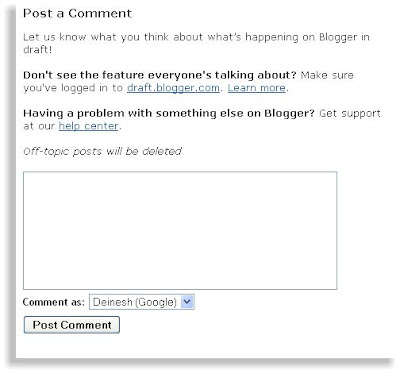
The most boring part of blogger comment box is that it opens in a separate window far from the blog post styled in other that doesn't match your blog.One of our friend in blogosphere named jack once have developed a hack that shows the comment form below each post in blogs . It was famous but it was not so much applicable.The comment form looks dirty and didn't match our blog colors.I am not telling that it was bad . Haloscan also brought a comment box but it was also not so much applicable.many of the bloggers experimented a lot to show the comment form beneath each of the blog posts.Finally blogger in draft blog brings the greatest comment form ever in blogger.

Blogger in draft blog is a official blog of Blogger.This blog displays the latest news in blogger in draft .After you set up a simple hack in your blog a comment form will be displayed below each of your blog posts just like in the snapshot at right.

It is simple to set up this comment form in your blog.First of all sign up into http://draft.blogger.com/.After that goto Blogger comments setting Page (Dashboard --> Settings --> Comments).You will see checked on " " in comment show Placement .After that check on Embedded below post and Save your Settings.


After you complete the above process you have to edit some codes in your Template.You need to replace some code with another code provided by Bloggerbuster.Therefore goto your blog Edit Html Page, Expand Template Widget and Search for the following Lines of Code.


<p class='comment-footer'>
<b:if cond='data:post.allowComments'>
<a expr:href='data:post.addCommentUrl' expr:onclick='data:post.addCommentOnclick'>
<data:postCommentMsg/></a></b:if></p>
Now Replace that with the following code.

<p class='comment-footer'>
<b:if cond='data:post.embedCommentForm'>
<b:include data='post' name='comment-form'/>
<b:else/> <b:if cond='data:post.allowComments'>
<a expr:href='data:post.addCommentUrl' expr:onclick='data:post.addCommentOnclick'><data:postCommentMsg/></a>
</b:if> </b:if> </p>
There are many additional features of this widget .If you like to read those all then visit this Page.

Update:
There is also an another a way to make it fast and easier.Thanks to infoteksite.You don't have to replace so long code.first of all search for the following code.

<b:include data='post' name='comments'/>

Now add the following code just after the above code.

<b:include data='post' name='comment-form'/>

Technorati Tags: , ,

Read more

There are numerous of reasons why should we comment . we comment on the posts of other Blogs which is good , informative and satisfies our queries . Number of comments also shows the popularity of that posts. There are various advantages of comments to the Bloggers and Readers .

if you comment on the posts of other Blogs your comments will be displayed in the Page of that Blog . People can visit your Blog following the link from the commented page of commented Blog . you can get a few traffic from it . moreover if the number of your comments is more than others then your name and your Blog link will be displayed in the top commentators list . you will get more traffic from it. Now many of the Bloggers also follow the link provided by the commentator.Your backlinks will be also counted from there.

All the above things are concluded from my personal experience . Once I had commented 3 or 4 times in a Blog in the gap of days . My comments were published there . many of the readers of that Blog visited by Blog following the link given while commenting on that Blog. Moreover my Blog name was also published on the top Commentators List of that Blog. I get more than 50 traffic from that Blog. So due to this fact I am writing this post. I hope you will like this post.

Read more